linux挂载国外各大网盘,以Onedrive为例

一、windows系统获取token串
所需要的软件: rclone-v1.48.0-windows-amd64.zip
下载地址:https://wxjdata-1259797711.cos.ap-beijing.myqcloud.com/rclone-v1.48.0-windows-amd64.zip
下载完之后解压,使用CMD命令进入到文件所在目录
 C:\Users\wxj>F:
 F:>cd 02、应用软件\recone\rclone-v1.48.0-windows-amd64
 F:\02、应用软件\recone\rclone-v1.48.0-windows-amd64>
开始配置获取token
F:\02、应用软件\recone\rclone-v1.48.0-windows-amd64>rclone config
 Current remotes:
 Name                 Type
 ====                 ====
 onedrive             onedrive
 onedrive-wxj         onedrive
 wxj1                 onedrive
 e) Edit existing remote
 n) New remote
 d) Delete remote
 r) Rename remote
 c) Copy remote
 s) Set configuration password
 q) Quit config
 e/n/d/r/c/s/q> n
 name> onedrive-wxj612
 Type of storage to configure.
 Enter a string value. Press Enter for the default ("").
 Choose a number from below, or type in your own value
  1 / A stackable unification remote, which can appear to merge the contents of several remotes
    \ "union"
  2 / Alias for an existing remote
    \ "alias"
  3 / Amazon Drive
    \ "amazon cloud drive"
  4 / Amazon S3 Compliant Storage Provider (AWS, Alibaba, Ceph, Digital Ocean, Dreamhost, IBM COS, Minio, etc)
    \ "s3"
  5 / Backblaze B2
    \ "b2"
  6 / Box
    \ "box"
  7 / Cache a remote
    \ "cache"
  8 / Dropbox
    \ "dropbox"
  9 / Encrypt/Decrypt a remote
    \ "crypt"
 10 / FTP Connection
    \ "ftp"
 11 / Google Cloud Storage (this is not Google Drive)
    \ "google cloud storage"
 12 / Google Drive
    \ "drive"
 13 / Hubic
    \ "hubic"
 14 / JottaCloud
    \ "jottacloud"
 15 / Koofr
    \ "koofr"
 16 / Local Disk
    \ "local"
 17 / Mega
    \ "mega"
 18 / Microsoft Azure Blob Storage
    \ "azureblob"
 19 / Microsoft OneDrive
    \ "onedrive"
 20 / OpenDrive
    \ "opendrive"
 21 / Openstack Swift (Rackspace Cloud Files, Memset Memstore, OVH)
    \ "swift"
 22 / Pcloud
    \ "pcloud"
 23 / QingCloud Object Storage
    \ "qingstor"
 24 / SSH/SFTP Connection
    \ "sftp"
 25 / Webdav
    \ "webdav"
 26 / Yandex Disk
    \ "yandex"
 27 / http Connection
    \ "http"
 Storage> 19
 ** See help for onedrive backend at: https://rclone.org/onedrive/ **
 Microsoft App Client Id
 Leave blank normally.
 Enter a string value. Press Enter for the default ("").
 client_id>
 Microsoft App Client Secret
 Leave blank normally.
 Enter a string value. Press Enter for the default ("").
 client_secret>
 Edit advanced config? (y/n)
 y) Yes
 n) No
 y/n> n
 Remote config
 Use auto config?
 Say Y if not sure
 Say N if you are working on a remote or headless machine
 y) Yes
 n) No
 y/n> y
 If your browser doesn't open automatically go to the following link: http://127.0.0.1:53682/auth
 Log in and authorize rclone for access
 Waiting for code…
这一步会弹出窗口,登陆自己的Onedrive即可
Choose a number from below, or type in an existing value
  1 / OneDrive Personal or Business
    \ "onedrive"
  2 / Root Sharepoint site
    \ "sharepoint"
  3 / Type in driveID
    \ "driveid"
  4 / Type in SiteID
    \ "siteid"
  5 / Search a Sharepoint site
    \ "search"
Your choice> 1
 Found 1 drives, please select the one you want to use:
 0: OneDrive (business) id=b!CkwuWX7ovkmoK8L1jDTG5Ce5paSzcBtMsoHjZT-bg4QQQk9JJrgiQaiDMWsGbOTq
 Chose drive to use:> 0
 Found drive 'root' of type 'business', URL: https://abcmitacnz-my.sharepoint.com/personal/wxj612_5t_ac_cn/Documents
 Is that okay?
 y) Yes
 n) No
 y/n> y
 [onedrive-wxj612]
 type = onedrive
token={“”}

 y) Yes this is OK
 e) Edit this remote
 d) Delete this remote
 y/e/d> y
 Current remotes:
Name                 Type
 ====                 ====
onedrive-wxj612      onedrive
需要复制整个token大括号里边的内容以作备用
二、linux系统挂载
软件下载即安装不在介绍,需要编译安装,很简单
软件下载地址:https://wxjdata-1259797711.cos.ap-beijing.myqcloud.com/rclone-v1.48.0-linux-amd64.zip
yum -y install fuse
curl https://rclone.org/install.sh | sudo bash
rclone脚本文件
https://wxjdata-1259797711.cos.ap-beijing.myqcloud.com/install.sh
配置并挂载
root@vultr:/onedrive-wxj# rclone config
 Current remotes:
 Name                 Type
 ====                 ====
 onedrive-wxj         onedrive
 wxj1                 onedrive
 e) Edit existing remote
 n) New remote
 d) Delete remote
 r) Rename remote
 c) Copy remote
 s) Set configuration password
 q) Quit config
 e/n/d/r/c/s/q> n
 name> onedrive-wxj612
 Type of storage to configure.
 Enter a string value. Press Enter for the default ("").
 Choose a number from below, or type in your own value
  1 / A stackable unification remote, which can appear to merge the contents of several remotes
    \ "union"
  2 / Alias for an existing remote
    \ "alias"
  3 / Amazon Drive
    \ "amazon cloud drive"
  4 / Amazon S3 Compliant Storage Provider (AWS, Alibaba, Ceph, Digital Ocean, Dreamhost, IBM COS, Minio, etc)
    \ "s3"
  5 / Backblaze B2
    \ "b2"
  6 / Box
    \ "box"
  7 / Cache a remote
    \ "cache"
  8 / Dropbox
    \ "dropbox"
  9 / Encrypt/Decrypt a remote
    \ "crypt"
 10 / FTP Connection
    \ "ftp"
 11 / Google Cloud Storage (this is not Google Drive)
    \ "google cloud storage"
 12 / Google Drive
    \ "drive"
 13 / Hubic
    \ "hubic"
 14 / JottaCloud
    \ "jottacloud"
 15 / Koofr
    \ "koofr"
 16 / Local Disk
    \ "local"
 17 / Mega
    \ "mega"
 18 / Microsoft Azure Blob Storage
    \ "azureblob"
 19 / Microsoft OneDrive
    \ "onedrive"
 20 / OpenDrive
    \ "opendrive"
 21 / Openstack Swift (Rackspace Cloud Files, Memset Memstore, OVH)
    \ "swift"
 22 / Pcloud
    \ "pcloud"
 23 / QingCloud Object Storage
    \ "qingstor"
 24 / SSH/SFTP Connection
    \ "sftp"
 25 / Webdav
    \ "webdav"
 26 / Yandex Disk
    \ "yandex"
 27 / http Connection
    \ "http"
 Storage> 19
 ** See help for onedrive backend at: https://rclone.org/onedrive/ **
 Microsoft App Client Id
 Leave blank normally.
 Enter a string value. Press Enter for the default ("").
 client_id>
 Microsoft App Client Secret
 Leave blank normally.
 Enter a string value. Press Enter for the default ("").
 client_secret>
 Edit advanced config? (y/n)
 y) Yes
 n) No
 y/n> n
 Remote config
 Use auto config?
 Say Y if not sure
 Say N if you are working on a remote or headless machine
 y) Yes
 n) No
 y/n> n
 For this to work, you will need rclone available on a machine that has a web browser available.
 Execute the following on your machine:
 rclone authorize "onedrive"
 Then paste the result below:
 result> {"access_token":
1 / OneDrive Personal or Business
    \ "onedrive"
  2 / Root Sharepoint site
    \ "sharepoint"
  3 / Type in driveID
    \ "driveid"
  4 / Type in SiteID
    \ "siteid"
  5 / Search a Sharepoint site
    \ "search"
 Your choice> 1
 Found 1 drives, please select the one you want to use:
 0: OneDrive (business) id=b!CkwuWX7ovkmoK8L1jDTG5Ce5paSzcBtMsoHjZT-bg4QQQk9JJrgiQaiDMWsGbOTq
 Chose drive to use:> 0
 Found drive 'root' of type 'business', URL: https://abcmitacnz-my.sharepoint.com/personal/wxj612_5t_ac_cn/Documents
 Is that okay?
 y) Yes
 n) No
 y/n> y
 [onedrive-wxj612]
 type = onedrive
y) Yes this is OK
 e) Edit this remote
 d) Delete this remote
 y/e/d> y
 Current remotes:
 Name                 Type
 ====                 ====
 onedrive-wxj         onedrive
 onedrive-wxj612      onedrive
 wxj1                 onedrive
挂载
root@vultr:/onedrive-wxj# rclone mount onedrive-wxj612:/wxj /onedrive-wxj612/ --copy-links --no-gzip-encoding --no-check-certificate --allow-other --allow-non-empty --umask 000
查看是否成功
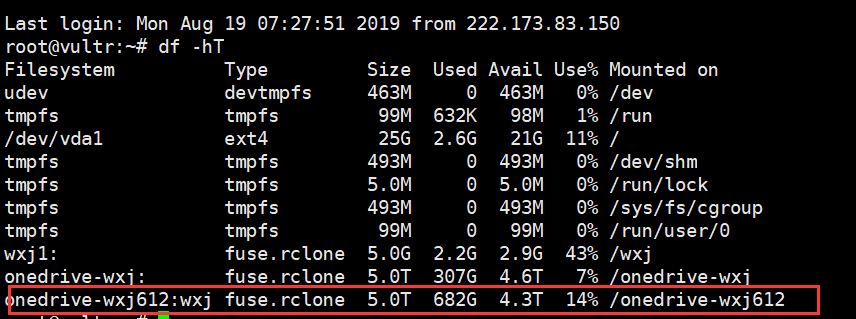
挂载成功
自动挂载
脚本下载地址:https://wxjdata-1259797711.cos.ap-beijing.myqcloud.com/rclone
root@vultr:~# wget  -O /etc/init.d/ https://wxjdata-1259797711.cos.ap-beijing.myqcloud.com/rclone
 /etc/init.d/: Is a directory
 root@vultr:~# wget  -O /etc/init.d/rclone https://wxjdata-1259797711.cos.ap-beijing.myqcloud.com/rclone
 --2019-08-19 08:00:52--  https://wxjdata-1259797711.cos.ap-beijing.myqcloud.com/rclone
 Resolving wxjdata-1259797711.cos.ap-beijing.myqcloud.com (wxjdata-1259797711.cos.ap-beijing.myqcloud.com)… 154.8.145.21, 140.143.114.236, 140.143.117.199, …
 Connecting to wxjdata-1259797711.cos.ap-beijing.myqcloud.com (wxjdata-1259797711.cos.ap-beijing.myqcloud.com)|154.8.145.21|:443… connected.
 HTTP request sent, awaiting response… 200 OK
 Length: 2130 (2.1K) [application/octet-stream]
 Saving to: ‘/etc/init.d/rclone’
 /etc/init.d/rclone             100%[=================================================>]   2.08K  --.-KB/s    in 0s
 2019-08-19 08:00:53 (83.4 MB/s) - ‘/etc/init.d/rclone’ saved [2130/2130]
编辑文件
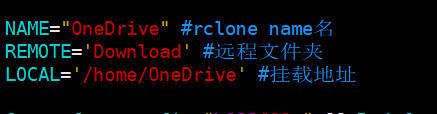
根据自己的修改
给予可执行权限
root@vultr:~# chmod a+x /etc/init.d/rclone
root@vultr:~# /etc/init.d/rclone start
 [信息] rclone (PID 12994) 正在运行…
声明:本站所有文章,如无特殊说明或标注,均为本站原创发布。任何个人或组织,在未征得本站同意时,禁止复制、盗用、采集、发布本站内容到任何网站、书籍等各类媒体平台。如若本站内容侵犯了原著者的合法权益,可联系我们进行处理。